

If you've ever looked at a commission payment and seen a strange, specific percentage — something like 59.68% instead of a clean 50% or 60% — you're not imagining things, and you're not being shortchanged. Here's what's actually happening, and what's changing to make it a whole lot clearer.
Why You Sometimes See an Odd Percentage
Your commission schedule pays you at different rates depending on how much you've closed for the year. A common setup looks like this: 50% up to a certain threshold, then 60% on everything after it.
Most of the time a payment lands entirely on one side of that line, and the math is simple. But every so often a single payment straddles it. Part of that payment finishes out the lower tier, and the rest spills into the higher one. Realcore pays each portion at its correct rate and then shows you the blended result — which is exactly why the percentage doesn't land on a round number.
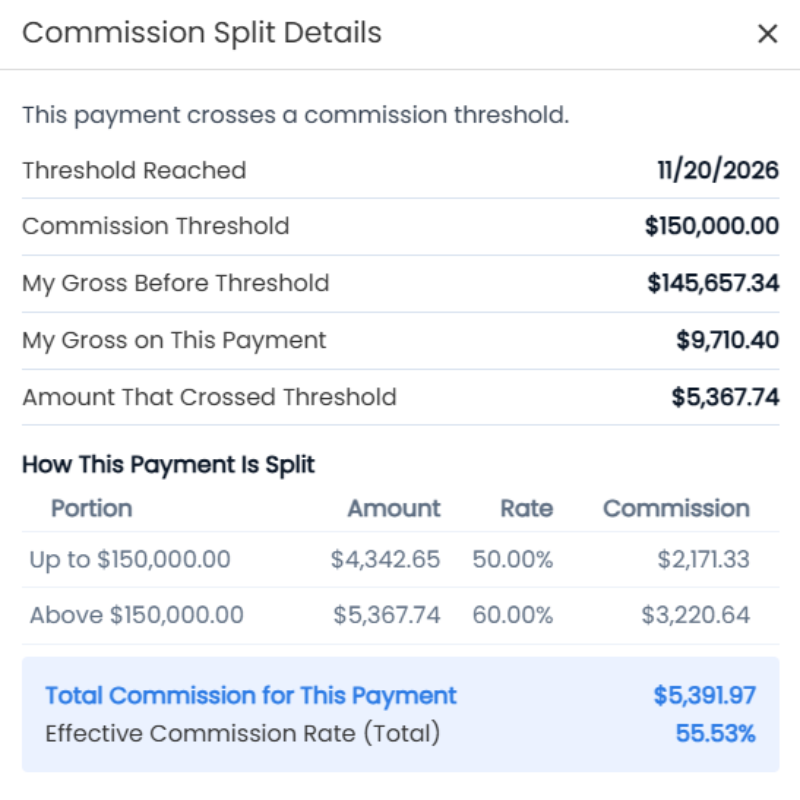
So an odd percentage is not an error. It's the sign that you just crossed a threshold, and that part of the payment earned you more.
Right now, though, that blended percentage is just a number. You know something crossed a threshold, but not exactly how much of your payment landed in each tier.
What That Looks Like With Real Numbers
Say your schedule pays 50% up to $100,000 and 60% after that, and you've closed $99,200 so far this year. Then a $25,000 payment comes in.
| Portion of the payment | Rate | Your commission |
|---|---|---|
| First $800 — finishes out the lower tier | 50% | $400 |
| Remaining $24,200 | 60% | $14,520 |
| Total $25,000 | 59.68% | $14,920 |
Your commission on that payment is $14,920, which works out to 59.68% of $25,000. Nothing unusual happened. You simply had $800 of room left in the lower tier, and the other $24,200 paid at the higher rate.
The numbers above are an example to show how the blend works — your own thresholds and rates come from your firm's commission schedule.
What's Changing in Angelo
In Realcore 4.0 (Angelo), that same blended percentage becomes a clickable link. Click it, and a breakdown opens showing exactly how the payment was split:
- The amount paid at each rate
- The commission earned on each portion
- Your total commission for that payment
No more guessing at the math behind the number. You'll see it, deal by deal, without having to ask anyone to reconstruct it for you.
Checking Your Split Tiers
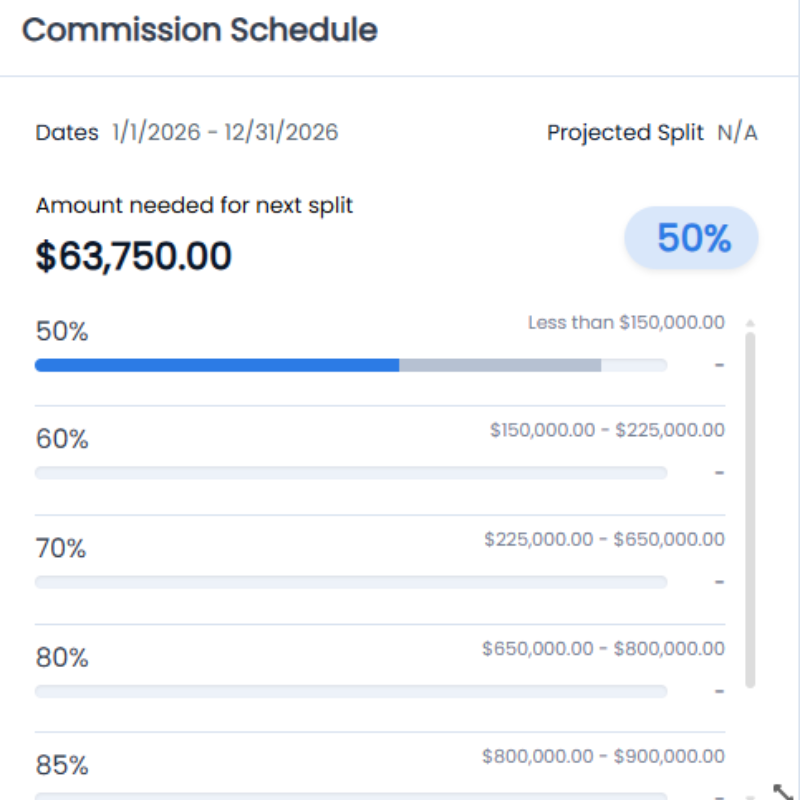
Whether you're on 3.0 or Angelo, you can already see your current split tier at the bottom of your pipeline. It tells you two things worth knowing at any moment:
- Which tier you're in right now
- How much more you need to close to reach the next one
That second number is the useful one. If you're sitting close to a threshold, it's worth knowing before you decide which deals to push on this quarter.
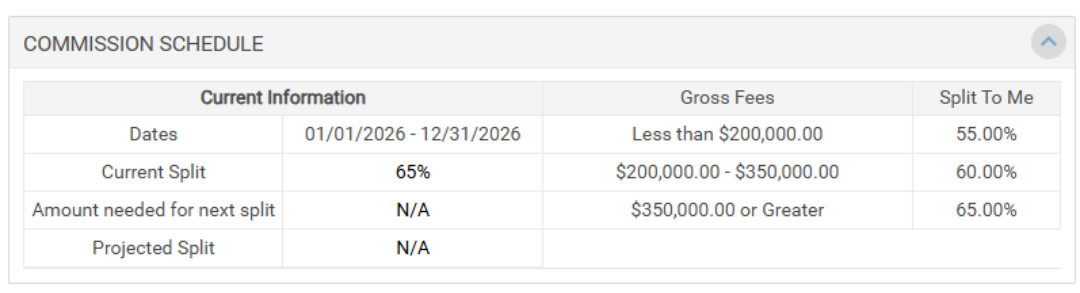
In Angelo, we've given that same view a cleaner look and made it easier to read at a glance, so you always know where you stand without digging for it.
What's Next
This month, our first round of beta users is moving into Angelo, and we're aiming to have every agent on board before the end of the year. As more of you get access, you'll start seeing these upgrades — like the clickable split breakdown — show up in your own pipeline.
We're here to help! If you need help finding specific data, email us at support@realcoreapps.com or visit our Support Page for tutorials and more. And don't forget — this month's live trainings are happening soon. No RSVP needed, just join. You'll find dates, times, and links on our Monthly Training page.