

Every agent knows the feeling — a commission you were counting on doesn't land when you expected, and suddenly the month is tighter than you planned. The good news is your pipeline already has the answer. You just have to look at it the right way.
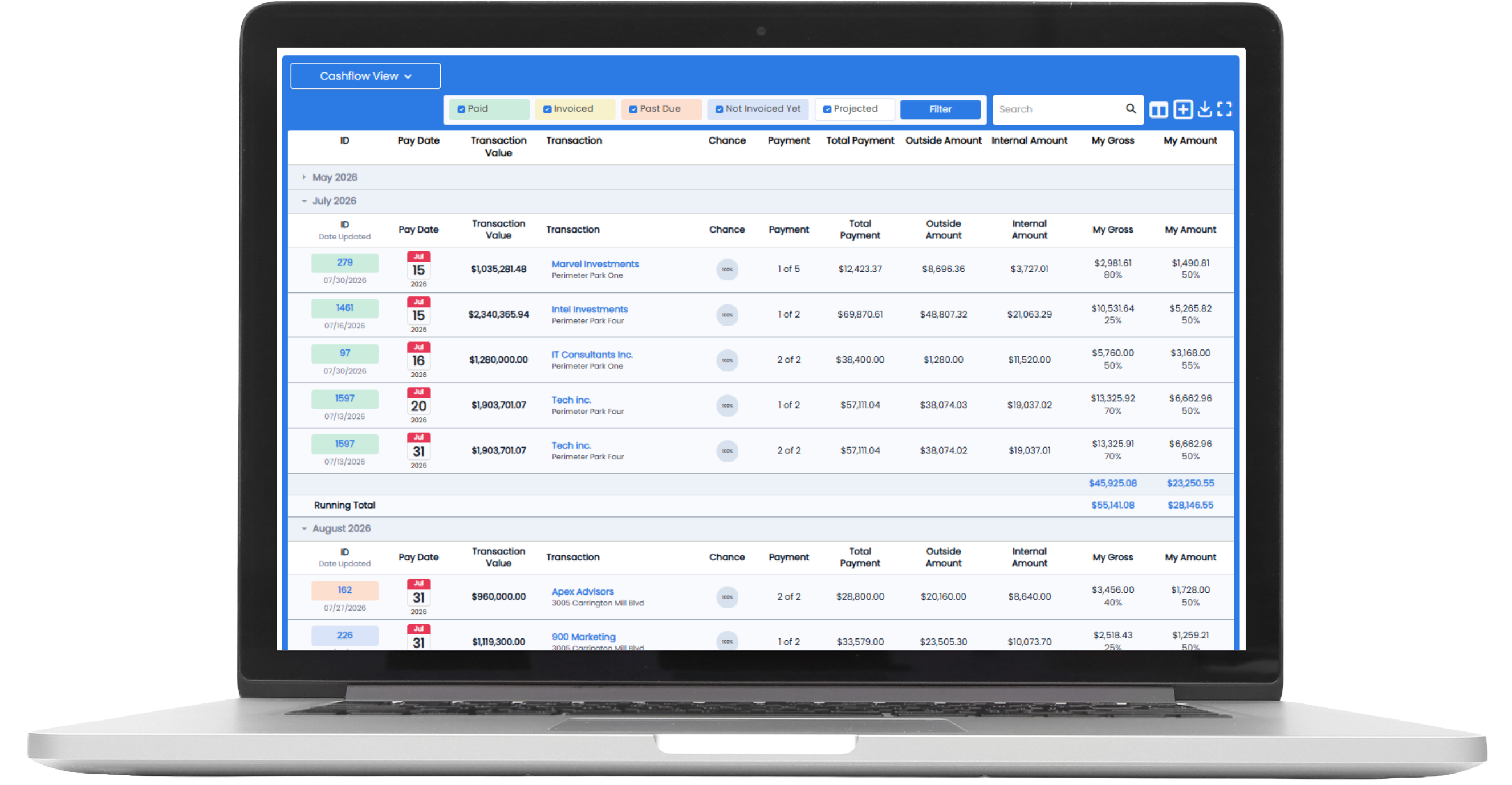
That's what the Cash Flow View is built for. It takes the deals already in Realcore and lays out your projected commission month by month, so you can see what's coming, when it's coming, and where the gaps are — before they catch you off guard.
From a list of deals to an income forecast
By default, most agents run their pipeline in Transaction View — a straightforward list of deals. Useful, but it doesn't tell the story of your income over time. Use the drop-down at the top of your Transactions section to switch to Cash Flow View, and everything reorganizes around when you actually expect to get paid. Now you're not just looking at deals — you're looking at a month-by-month forecast of your commission.
Read the colors, read your future
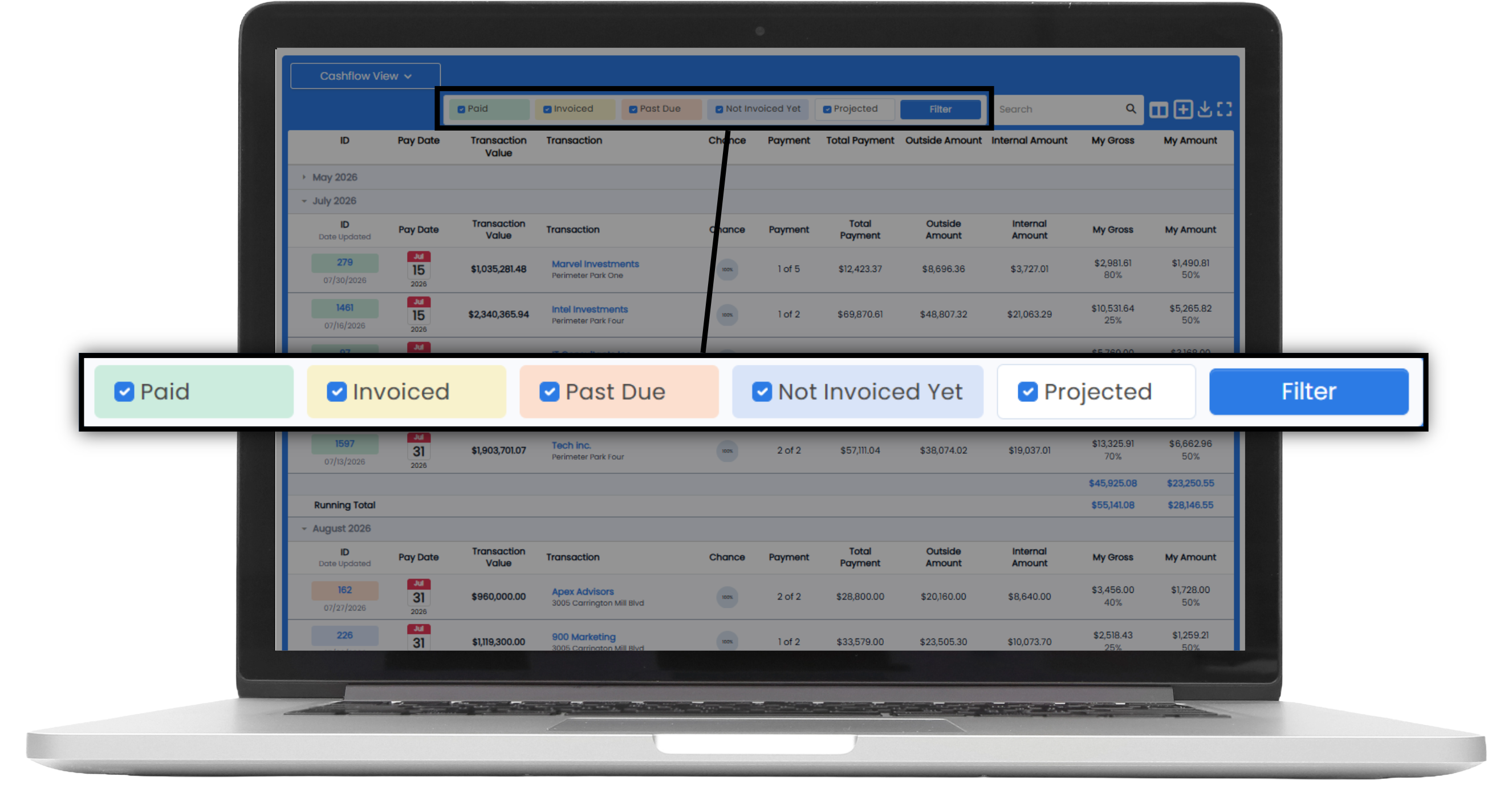
The real power is the color coding. At a glance, every payment tells you where it stands:
Green — closed, invoiced, and paid. Money in the bank.
Yellow — closed and invoiced within the last 30 days. On its way.
Orange — closed and invoiced more than 30 days ago. Needs a follow-up.
Blue — closed but not invoiced yet (usually a second-half payment).
White — not closed or invoiced yet. Still projected.
Once you know the colors, your whole year comes into focus. A month stacked with green and yellow? You're in great shape. A month that's mostly white with a couple of reds? That's your early warning to line up more business or tighten spending — while you still have time to do something about it.
The catch: a forecast is only as good as your dates
Here's what trips people up. The Cash Flow View forecasts based on the pay dates in your deals — and we don't get paid in the past. If a payment is still sitting on a date that's come and gone, your forecast is off. That's why the habit that makes this work is a quick monthly pipeline clean-up:
- Switch to Cash Flow View.
- Find any payment that isn't green and check its pay date.
- Move each one to the date you realistically expect payment (click the pay date, open the calendar, pick the new date).
- If a deal is red, follow up with the landlord to find out what's holding up payment — and drop a quick note in the deal so you remember.
Five or ten minutes at the end of each month keeps your forecast honest. It also surfaces the deals that quietly died and need to be removed, and reminds you of ones that should've been added.
Why it matters
Commercial commissions are lumpy. Some months are feast, some are famine — and the difference between a stressful month and a smooth one is usually just knowing it's coming. The Cash Flow View turns your pipeline from a to-do list into a planning tool: plan expenses around real projected income, spot a slow stretch months ahead, and walk into every month knowing roughly what's landing. Your pipeline already knows. Give it five minutes, and it'll tell you.
Want to see more of 4.0?
You don't have to wait until launch to get familiar with Angelo. We've put together a library of how-to videos available right now at www.realcoreapps.com/guide.
Log in with the password Angelo2026 to access walkthroughs of the new features and modules. We'll continue adding content as we get closer to launch, so check back regularly.
We’re here to help! If you need help finding specific data, email us at: support@realcoreapps.com or visit our Support Page for tutorials and more.
And don’t forget — this month’s live trainings are happening soon! No RSVP needed—just join. You’ll find dates, times, and links here.