

Tags are easy to overlook. They are small, they are colorful, and nobody files a support ticket when they get messy. But every tag your firm has created is a filter you can report on, and when the tag list is inconsistent, the numbers you pull off it are inconsistent too. Year-end is the right time to fix that.
What Your Tags Are Doing for You Right Now
A tag is a reusable label you put on a record so you can pull that group back out later. Realcore has five types today. Four are yours to manage as an administrator:
- Comp Tags
- Payment Tags
- Property Tags
- Transaction Tags
The fifth, Prospecting Tags, is managed by the broker. Those stay private to the agent who built them unless that agent chooses to share them.
You manage the company-wide four under the Administration tab, on the Tags page. Pick the category from the dropdown, click the add icon on the right, then name the tag and give it a color.
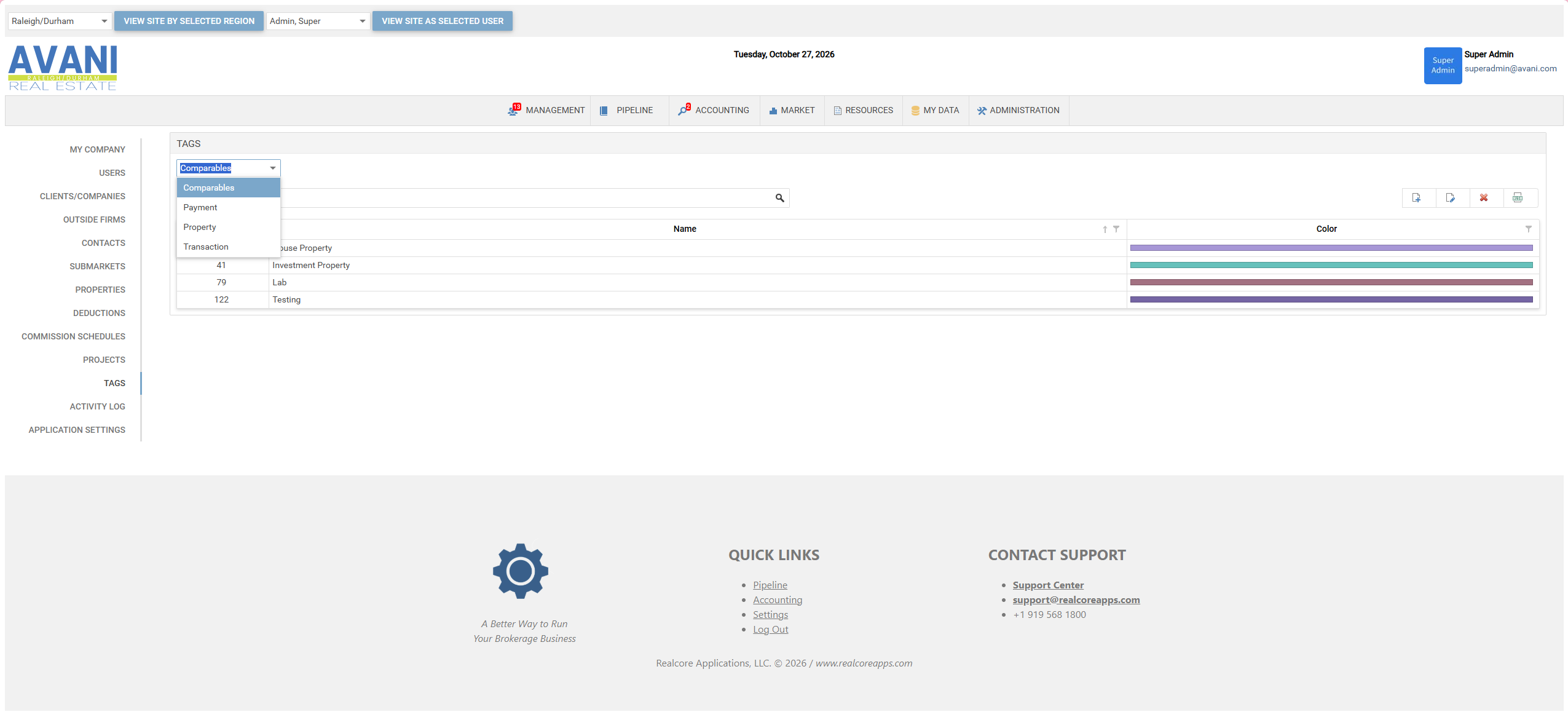
The part most firms underuse is that one record can carry more than one tag. A transaction tagged both Inbound and Network can be pulled either way, so you can answer "how much came to us inbound this year" and "how much came through the network" without anyone building you something custom. That only works if everyone is using the same tags the same way.
The Year-End Pass
You are already closing out the year. Give your tag list thirty minutes while you are in there. There are three jobs.
1. Read what is actually in there
Go category by category and read every tag out loud. You will find tags created for one deal three years ago, tags with typos, and tags nobody at the firm can define anymore. If you cannot say what a tag means in one sentence, it is not helping anyone's reporting.
2. Consolidate the duplicates
"Inbound," "In-Bound," and "IB" split one number into three, and every report built on top of them is quietly wrong. Pick the version that survives, move the records off the losing versions, then retire the extras. Always reassign the records first — a tag that is still attached to live deals should not disappear out from under them.
3. Write down the standard
Decide the rules and put them on one page: how tags get named, whether you abbreviate, what capitalization you use, who is allowed to create a new one, and what each surviving tag actually means. Then send it to your admins and your agents.
Most tag sprawl happens for an innocent reason. Someone could not find the tag that already existed, so they made another one. A short written standard and a known owner for new tags is what stops that cycle.
Why This Year Especially
Tagging expands significantly in Realcore 4.0 — Angelo. Tags move from four company-managed categories to ten, prospect tags gain a company-wide level alongside the broker's own, and the Tags page itself gets a real workbench: filter by category, search by keyword, export the list, and a Tag Usage panel that shows how many times each tag is actually in use and what share of your tagging it represents.

That usage panel is the one to look forward to. It answers the question this whole cleanup is about — which of these tags is anyone actually using? — without you having to go digging.
We covered the full Angelo tag expansion back in April, if you want the detail: Smarter Data Organization with Tags in Realcore 4.0.
Whatever you carry into Angelo is what you will be sorting into ten categories instead of four. A clean list going in is a far shorter project than a cleanup on the other side.
Need a Hand?
If you want help pulling your current tag list, or a second opinion on a firm-wide standard, email us at support@realcoreapps.com.
And don't forget our monthly training calls. Admin calls are the 3rd Wednesday of every month, agent calls the 3rd Thursday. Times and links are on our Monthly Training page — no RSVP, just join.